Important VTK filters and some special objects
 June 10, 2024
 3
minutes
3
minutes
There are a huge of VTK filters and other objects used in different contexts. Here, I’d like to list a couple of useful filters and objects that are frequently used in CAD rendering.
Isoline
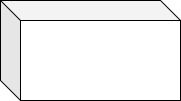
Isoline is usually used in the CAD design process and sometimes affects the CAD proper representation, which looks like below. When isolines are exported into a geometry file, VTK renders it by default. Hence, we need to remove the isolines if it is possible.
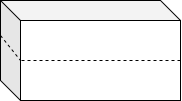
IVtkTools_DisplayModeFilter is used to remove the isolines, but be careful. It may clear all parts for facet-style geometry.
#include "IVtkTools_DisplayModeFilter.hxx"
//prepared vtkPolyData source
vtkSmartPointer<<IVtkTools_DisplayModeFilter> filter = vtkSmartPointer<IVtkTools_DisplayModeFilter>::New();
filter->AddInputConnection(source->GetOutputPort());
filter->SetDisplayMode(DM_Shading);

vtkSmartPointer<vtkPolyDataMapper> mapper = vtkSmartPointer<vtkPolyDataMapper>::New();
mapper->SetInputConnection(filter->GetOutputPort());
Geometry surface picker
The geometry picker is a common tool to observe geometry by highlighting points, lines, and surfaces. There are two possible ways to implement the function: 1 Build up the actor from points, lines, and surfaces, 2 Choose them from a geometry actor. The former way is precise and has more information, but the latter is also needed in some situations and VTK provides a method to get picked surfaces from a geometry actor.
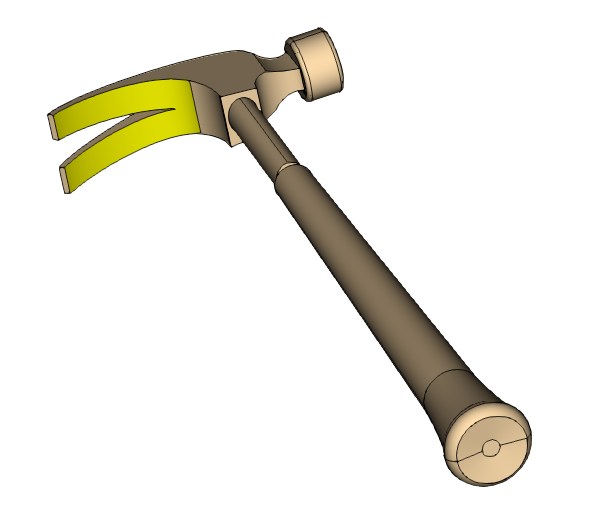
If we would like to highlight the part rendered in yellow color in this picture, what shall we do?
First, we need to find the surface part by picking it up with a mouse click. VTK provides us with a filter vtkPolyDataConnectivityFilter which could filters the connected surface with a picked position.
#include <vtkDataSetSurfaceFilter.h>
#include <vtkPolyDataConnectivityFilter.h>

//prepare a vtkCellPicker 'm_cellPicker' which get picked cell from an interactor event
int* pos = this->GetInteractor()->GetEventPosition();
cellPicker->Pick(pos[0], pos[1], pos[2], this->GetDefaultRenderer());
vtkIdType cellId = cellPicker->GetCellId();

//if picked cell is valid, then find the connected surface
if (cellId != -1)
{
    //extract surface from imported data
    vtkSmartPointer<vtkDataSetSurfaceFilter> surfaceFilter = vtkSmartPointer<vtkDataSetSurfaceFilter>::New();
    surfaceFilter->SetInputData(dataset);
    surfaceFilter->Update();

    //set extraction mode to cellseededregions, seed by cellId and find the connected surfaces
    vtkSmartPointer<vtkPolyDataConnectivityFilter> connFilter = vtkSmartPointer<vtkPolyDataConnectivityFilter>::New();
    connFilter->SetInputData(surfaceFilter->GetOutput());
    connFilter->SetExtractionModeToCellSeededRegions();
    connFilter->AddSeed(cellId);
    connFilter->Update();

    //move on and proceed with the common process of VTK rendering
    vtkSmartPointer<vtkPolyDataMapper> mapper = vtkSmartPointer<vtkPolyDataMapper>::New();
    mapper->SetInputConnection(connFilter->GetOutputPort());
    ...
}
Now we’ve got the connected surface part data, then we build up an actor with the data and render it in yellow color. That’s all.
Memory management
VTK allocates a vast volume of memory and generates a lot of temporary stuffs when reading data from files, but it doesn’t release the memory immediately sometimes. If there are a series of large data files waiting to be processed, the computer system may be at stake of lacking memory. Fortunately, we could trigger garbage collector actively. Comparing with allocated memory without vtkGarbageCollector, VTK consumes at most 50% memory.
vtkObject::GlobalWarningDisplayOff(); //Agree to collect garbage actively
vtkGarbageCollector::Collect();       //collect garbage
Reference
VTK doc
VTK pipeline and an example
| VTK |