VTK pipeline and an example
 April 29, 2024
 3
minutes
3
minutes
The Visualization Toolkit (VTK) is an open-source software system for image processing, 3D graphics, volume rendering, and visualization. It could be used on a singleton PC or a distributed system, which ParaView has implemented based on VTK. Also, VTK is BSD-licensed and is free to use.
Rendering pipeline of VTK
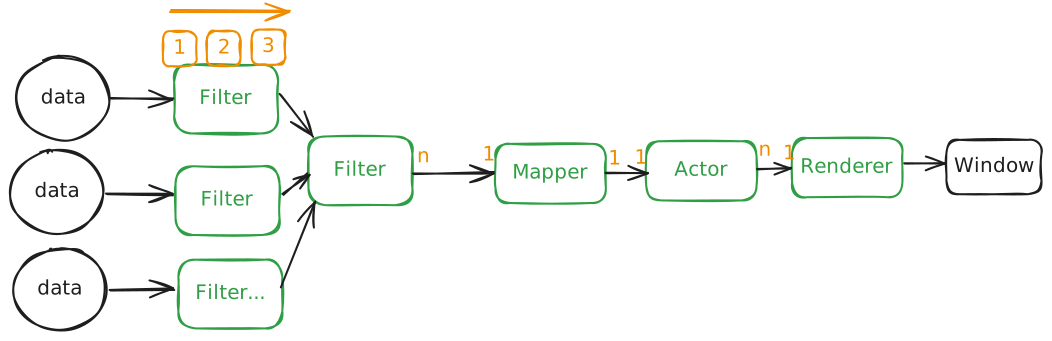
VTK pipeline has several general processes: data, filter, mapper, actor, renderer and window. VTK has different types of data, e.g., VTKPolyData( container for 2-dimensional cells, like triangles), VTKUnstructuredGrid( container for various types of cells, like lines, triangles, tetras etc.) etc.
VTKFilter is a series of functions that filter data to meet our demands. For example, if we want to show the surface of a sphere and we have the tetras of a sphere, then VTKSurfaceFilter could work on the process to get the surface of the sphere. VTKFilter can work one-by-one and obtain a final output for VTKMapper. VTKMapper controls the relative position of input data, including the overlapped positioned data. Because VTKMapper is an abstract object, VTKPolyDataMapper is used for VTKPolyData and vtkDataSetMapper works for VTKUnstructuredGrid.
VTKMapper accepts the output data and then gives it to VTKActor, which plays an important role in the VTK pipeline. VTKActor has VTKProperty of coloring, lighting, etc. . A VTKActor is a prepared model, and in the stadium of a VTKRenderer, there are a lot of VTKActors.In the end, the VTKRenderWindow renders all VTKActors and interacts with them using VTKInteractor .
A VTK example
Here is an example: There is a hammer and I’d like to render its feature edge in the window. Assume you’ve got the data of the hammer (Referenced for Read cad geometry and assemblies with OCCT).
//include vtk headers we need

//Prepare data source from an OCCT shape
IVtkTools_ShapeDataSource* source = IVtkTools_ShapeDataSource::New();
source->SetShape(new IVtkOCC_Shape(shape));

//filter
vtkSmartPointer<vtkFeatureEdges> featureEdges =
                vtkSmartPointer<vtkFeatureEdges>::New();
featureEdges->SetInputConnection(source->GetOutputPort());
featureEdges->BoundaryEdgesOn();  // Extract boundary edges
featureEdges->FeatureEdgesOn();   // Extract feature edges
featureEdges->ColoringOn();
featureEdges->SetFeatureAngle(30.0);  // Set the feature angle (adjust as needed)

//mapper
vtkSmartPointer<vtkPolyDataMapper> mapper =
                vtkSmartPointer<vtkPolyDataMapper>::New();
mapper->SetInputConnection(featureEdges->GetOutputPort());
//mapper->SetInputConnection(source->GetOutputPort()); //without filters

//actor
vtkSmartPointer<vtkActor> actor =
                vtkSmartPointer<vtkActor>::New();
actor->SetMapper(mapper);

//renderer
vtkSmartPointer<vtkRenderer> renderer =
                vtkSmartPointer<vtkRenderer>::New();

//window
vtkSmartPointer<vtkRenderWindow> renderWindow =
                vtkSmartPointer<vtkRenderWindow>::New();
renderWindow->AddRenderer(renderer);

//interactor
vtkSmartPointer<<vtkRenderWindowInteractor> renderWindowInteractor =
    			vtkSmartPointer<vtkRenderWindowInteractor>::New();
renderWindowInteractor->SetRenderWindow(renderWindow);
renderWindowInteractor->Initialize();

//render
renderWindow->Render();
renderWindowInteractor->Start();
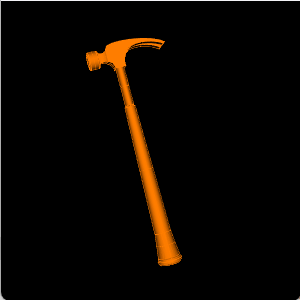
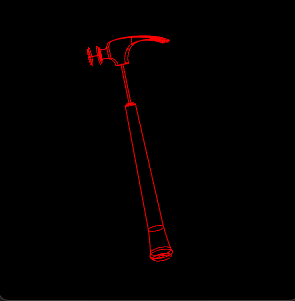
The final output of geometry with and without filtering looks like pictures below.
Reference
VTK doc
Remote and parallel visualization of ParaView
| VTK |